React 学习笔记:Reducer Hook
发布于: 2026-06-03 17:54:54 更新于: 2026-06-03 17:54:54
useReducer 基础
基本用法
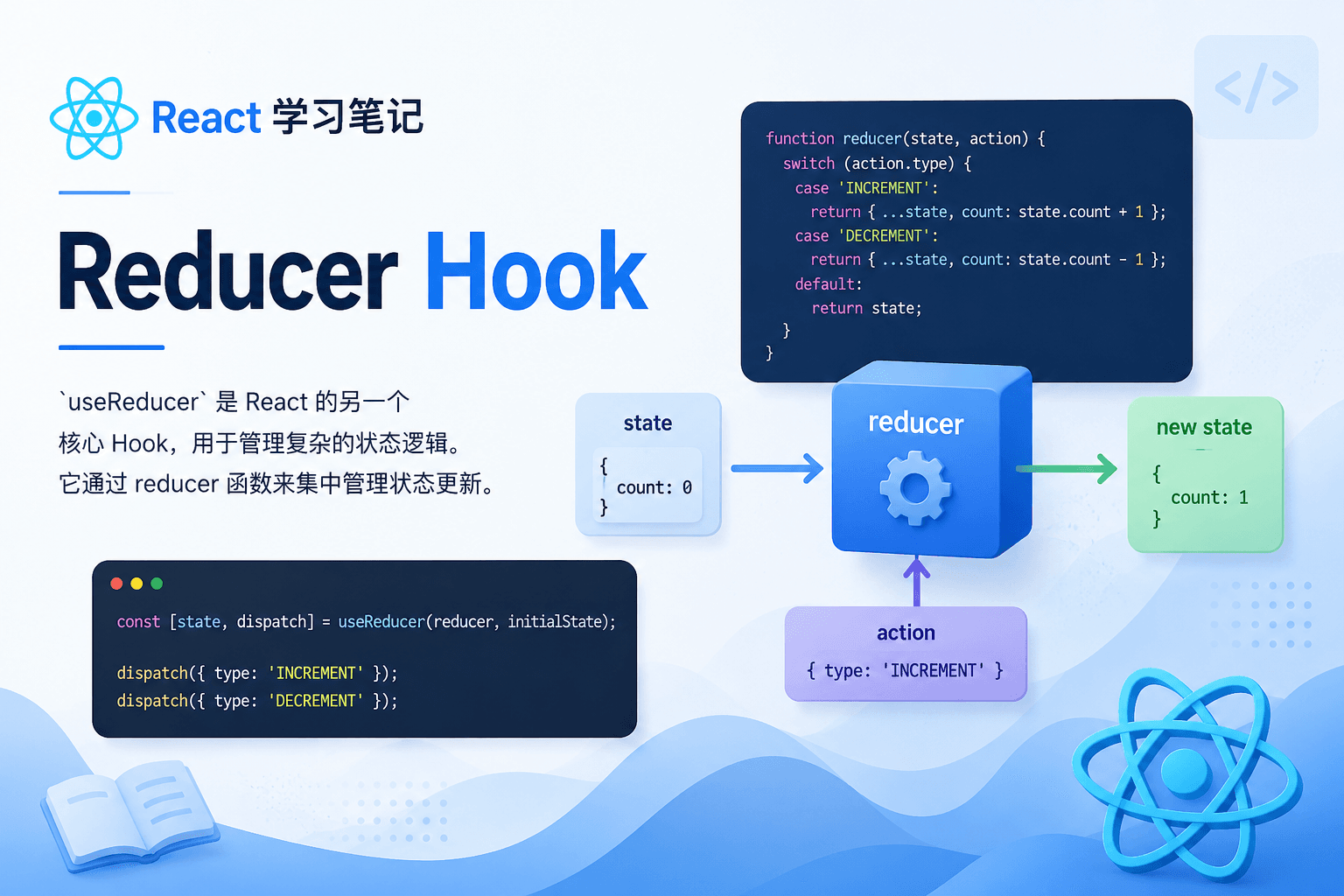
useReducer 是 React 的另一个核心 Hook,用于管理复杂的状态逻辑。它通过 reducer 函数来集中管理状态更新。
import { useReducer } from "react";

// 定义 reducer 函数
function reducer(state, action) {
  switch (action.type) {
    case "increment":
      return { count: state.count + 1 };
    case "decrement":
      return { count: state.count - 1 };
    default:
      throw new Error("未知 action 类型");
  }
}

function Counter() {
  // 使用 useReducer
  const [state, dispatch] = useReducer(reducer, { count: 0 });

  return (
    <div>
      <p>计数: {state.count}</p>
      <button onClick={() => dispatch({ type: "decrement" })}>-</button>
      <button onClick={() => dispatch({ type: "increment" })}>+</button>
    </div>
  );
}
关键点:
- 在组件顶层调用
useReducer - reducer 函数接收当前状态和 action,返回新状态
- 通过 dispatch 函数触发状态更新
参数说明
useReducer(reducer, initialArg, init?) 接收三个参数:
| 参数 | 说明 |
|---|---|
| reducer | 纯函数,接收 state 和 action,返回更新后的 state |
| initialArg | 用于初始化 state 的任意值 |
| init(可选) | 初始化函数,若存在则以 init(initialArg) 的结果作为初始值 |
// 方式 1:直接传递初始值
const [state, dispatch] = useReducer(reducer, { count: 0 });

// 方式 2:使用初始化函数(惰性初始化)
const [state, dispatch] = useReducer(reducer, initialArg, init);

function init(initialArg) {
  return { count: initialArg };
}
返回值
返回一个包含两个元素的数组:
- 当前状态值:首次渲染时为
init(initialArg)的结果(无init时为initialArg) - dispatch 函数:用于触发状态更新
const [state, dispatch] = useReducer(reducer, { count: 0 });
//      ↓       ↓
//  当前状态  dispatch 函数
dispatch 函数详解
- 参数:action,通常是一个带
type属性的对象,可携带额外信息 - 返回值:无返回值
- 特点:引用稳定,可在 Effect 依赖数组中安全省略
// 基本调用
dispatch({ type: "increment" });

// 携带额外数据
dispatch({ type: "changed_name", nextName: "张三" });

// 使用载荷(payload)模式
dispatch({ type: "increment", payload: 5 });
完整使用示例
示例 1:对象类型状态
import { useReducer } from "react";

// reducer 函数
function userReducer(state, action) {
  switch (action.type) {
    case "changed_name":
      return { ...state, name: action.nextName };
    case "incremented_age":
      return { ...state, age: state.age + 1 };
    default:
      throw Error("未知 action: " + action.type);
  }
}

function UserProfile() {
  const [state, dispatch] = useReducer(userReducer, {
    name: "张三",
    age: 25,
  });

  return (
    <div>
      <input
        value={state.name}
        onChange={(e) =>
          dispatch({
            type: "changed_name",
            nextName: e.target.value,
          })
        }
      />
      <button onClick={() => dispatch({ type: "incremented_age" })}>
        明年 {state.age + 1} 岁
      </button>
      <p>
        你好,{state.name},你 {state.age} 岁
      </p>
    </div>
  );
}
示例 2:数组类型状态(Todo List)
import { useReducer } from "react";

let nextId = 0;

function tasksReducer(tasks, action) {
  switch (action.type) {
    case "added":
      return [
        ...tasks,
        {
          id: action.id,
          text: action.text,
          done: false,
        },
      ];
    case "changed":
      return tasks.map((task) =>
        task.id === action.task.id ? action.task : task,
      );
    case "deleted":
      return tasks.filter((task) => task.id !== action.id);
    default:
      throw Error("未知 action: " + action.type);
  }
}

function TaskApp() {
  const [tasks, dispatch] = useReducer(tasksReducer, []);

  function handleAdd(text) {
    dispatch({
      type: "added",
      id: nextId++,
      text: text,
    });
  }

  function handleChange(task) {
    dispatch({
      type: "changed",
      task: task,
    });
  }

  function handleDelete(taskId) {
    dispatch({
      type: "deleted",
      id: taskId,
    });
  }

  return (
    <div>
      <button onClick={() => handleAdd("新任务")}>添加任务</button>
      <ul>
        {tasks.map((task) => (
          <li key={task.id}>
            <input
              type="checkbox"
              checked={task.done}
              onChange={(e) =>
                handleChange({
                  ...task,
                  done: e.target.checked,
                })
              }
            />
            {task.text}
            <button onClick={() => handleDelete(task.id)}>删除</button>
          </li>
        ))}
      </ul>
    </div>
  );
}
示例 3:使用 Immer 简化更新
import { useImmerReducer } from "use-immer";

function tasksReducer(draft, action) {
  switch (action.type) {
    case "added":
      // 可以直接"修改" draft
      draft.push({
        id: action.id,
        text: action.text,
        done: false,
      });
      break;
    case "changed":
      const index = draft.findIndex((t) => t.id === action.task.id);
      draft[index] = action.task;
      break;
    case "deleted":
      return draft.filter((task) => task.id !== action.id);
    default:
      throw Error("未知 action: " + action.type);
  }
}

function TaskApp() {
  const [tasks, dispatch] = useImmerReducer(tasksReducer, []);
  // ... 其余逻辑相同
}
Reducer 设计模式
1. 标准 Action 结构
// 推荐的 action 结构
{
  type: 'action_type',      // 必需:描述动作类型
  payload: { ... },         // 可选:携带的数据
  meta: { ... },            // 可选:元数据
  error: true               // 可选:是否为错误动作
}

// 示例
dispatch({
  type: 'user_updated',
  payload: { name: '新名字', age: 30 }
});
2. Action Creators(动作创建器)
// 将 action 创建逻辑抽离出来
const actions = {
  addTask: (text) => ({
    type: "added",
    id: nextId++,
    text,
  }),
  updateTask: (task) => ({
    type: "changed",
    task,
  }),
  deleteTask: (id) => ({
    type: "deleted",
    id,
  }),
};

// 使用
dispatch(actions.addTask("新任务"));
dispatch(actions.updateTask(updatedTask));
dispatch(actions.deleteTask(taskId));
3. 处理复杂状态更新
function shoppingCartReducer(state, action) {
  switch (action.type) {
    case "added_to_cart":
      const existingItem = state.items.find(
        (item) => item.id === action.productId,
      );

      if (existingItem) {
        // 已存在:增加数量
        return {
          ...state,
          items: state.items.map((item) =>
            item.id === action.productId
              ? { ...item, quantity: item.quantity + 1 }
              : item,
          ),
        };
      } else {
        // 不存在:添加新商品
        return {
          ...state,
          items: [
            ...state.items,
            {
              id: action.productId,
              quantity: 1,
              price: action.price,
            },
          ],
        };
      }

    case "removed_from_cart":
      return {
        ...state,
        items: state.items.filter((item) => item.id !== action.productId),
      };

    case "updated_quantity":
      return {
        ...state,
        items: state.items.map((item) =>
          item.id === action.productId
            ? { ...item, quantity: action.quantity }
            : item,
        ),
      };

    default:
      throw Error("未知 action: " + action.type);
  }
}
useReducer vs useState 对比
何时选择 useReducer?
| 场景 | 推荐使用 |
|---|---|
| 状态逻辑简单(单个值) | useState |
| 状态逻辑复杂(多个子值) | useReducer |
| 下一个状态依赖前一个状态 | useReducer |
| 需要集中管理状态更新逻辑 | useReducer |
| 需要复用状态更新逻辑 | useReducer |
| 需要更好的可测试性 | useReducer |
代码对比
useState 方式:
function Counter() {
  const [count, setCount] = useState(0);

  const increment = () => setCount((c) => c + 1);
  const decrement = () => setCount((c) => c - 1);
  const reset = () => setCount(0);

  return (
    <div>
      <button onClick={decrement}>-</button>
      <span>{count}</span>
      <button onClick={increment}>+</button>
      <button onClick={reset}>重置</button>
    </div>
  );
}
useReducer 方式:
function reducer(state, action) {
  switch (action.type) {
    case "increment":
      return { count: state.count + 1 };
    case "decrement":
      return { count: state.count - 1 };
    case "reset":
      return { count: 0 };
    default:
      throw Error("未知 action");
  }
}

function Counter() {
  const [state, dispatch] = useReducer(reducer, { count: 0 });

  return (
    <div>
      <button onClick={() => dispatch({ type: "decrement" })}>-</button>
      <span>{state.count}</span>
      <button onClick={() => dispatch({ type: "increment" })}>+</button>
      <button onClick={() => dispatch({ type: "reset" })}>重置</button>
    </div>
  );
}
优势对比
useReducer 的优势:
- 逻辑复用:reducer 函数可以在多个组件间共享
- 可测试性:reducer 是纯函数,易于单元测试
- 清晰性:状态更新逻辑集中管理,易于理解
- dispatch 引用稳定:不需要像 useState 那样使用 useCallback
- 适合复杂状态:处理多个子值或依赖前一个状态的场景
useState 的优势:
- 简单直观:适合简单的状态管理
- 代码量少:不需要定义 reducer 和 action
- 学习成本低:更容易上手
自定义 Hook 封装
封装通用的 useReducer Hook
function useReducerWithLogger(reducer, initialState) {
  const [state, dispatch] = useReducer(reducer, initialState);

  const dispatchWithLogger = useCallback(
    (action) => {
      console.group("Action dispatched");
      console.log("Previous State:", state);
      console.log("Action:", action);

      dispatch(action);

      // 注意:这里拿到的还是旧 state
      // 如需新 state,需要手动计算
      const newState = reducer(state, action);
      console.log("Next State:", newState);
      console.groupEnd();
    },
    [state, reducer],
  );

  return [state, dispatchWithLogger];
}
封装异步 Action 处理
function useAsyncReducer(reducer, initialState) {
  const [state, dispatch] = useReducer(reducer, initialState);

  const asyncDispatch = useCallback(
    async (action) => {
      if (typeof action === "function") {
        // 支持 thunk 模式
        await action(dispatch, () => state);
      } else {
        dispatch(action);
      }
    },
    [state],
  );

  return [state, asyncDispatch];
}

// 使用示例
function UserProfile({ userId }) {
  const [state, dispatch] = useAsyncReducer(userReducer, {
    loading: false,
    data: null,
    error: null,
  });

  const fetchUser = useCallback(async () => {
    dispatch({ type: "fetch_start" });
    try {
      const response = await fetch(`/api/users/${userId}`);
      const data = await response.json();
      dispatch({ type: "fetch_success", payload: data });
    } catch (error) {
      dispatch({ type: "fetch_error", payload: error.message });
    }
  }, [userId]);

  useEffect(() => {
    fetchUser();
  }, [fetchUser]);

  if (state.loading) return <div>加载中...</div>;
  if (state.error) return <div>错误: {state.error}</div>;
  if (!state.data) return null;

  return <div>{state.data.name}</div>;
}
标签分类
# React# 前端